An A-Z Index of the Windows XP command line
Click on the commands to know more about them.
ADDUSERS Add or list users to/from a CSV file
ARP Address Resolution Protocol
ASSOC Change file extension associations
ASSOCIAT One step file association
AT Schedule a command to run at a later time
ATTRIB Change file attributes
BOOTCFG Edit Windows boot settings
BROWSTAT Get domain, browser and PDC info
CACLS Change file permissions
CALL Call one batch program from another
CD Change Directory - move to a specific Folder
CHANGE Change Terminal Server Session properties
CHKDSK Check Disk - check and repair disk problems
CHKNTFS Check the NTFS file system
CHOICE Accept keyboard input to a batch file
CIPHER Encrypt or Decrypt files/folders
CleanMgr Automated cleanup of Temp files, recycle bin CLEARMEM Clear memory leaks
CLIP Copy STDIN to the Windows clipboard.CLS Clear the screenCLUSTER Windows Clustering
CMD Start a new CMD shell
COLOR Change colors of the CMD window
COMP Compare the contents of two files or sets of filesCOMPACT Compress files or folders on an NTFS partitionCOMPRESS Compress individual files on an NTFS partition
CON2PRT Connect or disconnect a PrinterCONVERT Convert a FAT drive to NTFS.
COPY Copy one or more files to another location
CSCcmd Client-side caching (Offline Files)
CSVDE Import or Export Active Directory data
DATE Display or set the dateDcomcnfg DCOM Configuration Utility
DEFRAG Defragment hard drive
DEL Delete one or more files
DELPROF Delete NT user profiles
DELTREE Delete a folder and all subfolders
DevCon Device Manager Command Line Utility
DIR Display a list of files and folders
DIRUSE Display disk usage
DISKCOMP Compare the contents of two floppy disks
DISKCOPY Copy the contents of one floppy disk to anotherDNSSTAT DNS Statistics
DOSKEY Edit command line, recall commands, and create macros
DSADD Add user (computer, group..) to active directory DSQUERY List items in active directory
DSMOD Modify user (computer, group..) in active directory
ECHO Display message on screen
ENDLOCAL End localisation of environment changes in a batch file
ERASE Delete one or more files
EXIT Quit the CMD shell
EXPAND Uncompress files
EXTRACT Uncompress CAB files
FC Compare two files
FDISK Disk Format and partition
FIND Search for a text string in a file
FINDSTR Search for strings in files
FOR /F Loop command: against a set of files
FOR /F Loop command: against the results of another command
FOR Loop command: all options Files, Directory, List
FORFILES Batch process multiple files
FORMAT Format a diskFREEDISK Check free disk space (in bytes)
FSUTIL File and Volume utilities
FTP File Transfer Protocol
FTYPE Display or modify file types used in file extension associations
03 September, 2008

22 August, 2008
Get Paid to Read E-mail (no investment) no scam
Invitation to join RupeeMail!
Hi ,
I have something interesting for you, RupeeMail!
It’s really amazing! You get paid to open & read the contents of RupeeMail. You receive promotional offers & special discounts in RupeeMail.
Interestingly RupeeMails will reach you based on the preference list you opted for.
Create your RupeeMail Account & refer your friends to earn launch referral bonus on every new registration.
Try this... http://www.rupeemail.in/rupeemail/invite.do?in=MTc5MTg2JSMlblBESFhBVmhxTjhHdXIweGNqT3ZLZDYyVw==
RupeeMail, It pays
{Sunney Agarwal}
Hi ,
I have something interesting for you, RupeeMail!
It’s really amazing! You get paid to open & read the contents of RupeeMail. You receive promotional offers & special discounts in RupeeMail.
Interestingly RupeeMails will reach you based on the preference list you opted for.
Create your RupeeMail Account & refer your friends to earn launch referral bonus on every new registration.
Try this... http://www.rupeemail.in/rupeemail/invite.do?in=MTc5MTg2JSMlblBESFhBVmhxTjhHdXIweGNqT3ZLZDYyVw==
RupeeMail, It pays
{Sunney Agarwal}
13 August, 2008
How to Start Windows Programs Quickly with RUN COMMANDS
The run option of Start menu is used to run a program or to open a document directly.
If you do not know the exact location of the program or document then click on Start button to open Run and type the programs shortcut name to open it directly.
Run Commands
- appwiz.cpl -- Used to run Add/Remove wizard
- Calc --Calculator
- Cfgwiz32 --ISDN Configuration Wizard
- Charmap --Character Map
- Chkdisk --Repair damaged files
- Cleanmgr --Cleans up hard drives
- Clipbrd --Windows Clipboard viewer
- Control --Displays Control Panel
- Cmd --Opens a new Command Window
- Control mouse --Used to control mouse properties
- Dcomcnfg --DCOM user security
- Debug --Assembly language programming tool
- Defrag --Defragmentation tool
- Drwatson --Records programs crash & snapshots
- Dxdiag --DirectX Diagnostic Utility
- Explorer --Windows Explorer
- Fontview --Graphical font viewer
- Fsmgmt.msc -- Used to open shared folders
- Firewall.cpl -- Used to configure windows firewall
- Ftp -ftp.exe program
- Hostname --Returns Computer's name
- Hdwwiz.cpl -- Used to run Add Hardware wizard
- Ipconfig --Displays IP configuration for all network adapters
- Logoff -- Used to logoff the computer
- MMC --Microsoft Management Console
- Msconfig --Configuration to edit startup files
- Mstsc -- Used to access remote desktop
- Mrc -- Malicious Software Removal Tool
- Msinfo32 --Microsoft System Information Utility
- Nbtstat --Displays stats and current connections using NetBIOS over TCP/IP
- Netstat --Displays all active network connections
- Nslookup--Returns your local DNS server
- Osk ---Used to access on screen keyboard
- Perfmon.msc -- Used to configure the performance of Monitor.
- Ping --Sends data to a specified host
- /IPPowercfg.cpl -- Used to configure power option
- Regedit --Registry Editor
- Regwiz -- Registration wizard
- Sfc /scannow -- System File Checker
- Sndrec32 --Sound Recorder
- Shutdown -- Used to shutdown the windows
- Spider -- Used to open spider solitaire card game
- Sfc / scannow -- Used to run system file checker utility.
- Sndvol32 --Volume control for soundcard
- Sysedit -- Edit system startup files
- Taskmgr --Task manager
- Telephon.cpl -- Used to configure modem options.
- Telnet --Telnet program
- Tracert --Traces and displays all paths required to reach an internet host
- Winchat -- Used to chat with Microsoft
- Wmplayer -- Used to run Windows Media player
- Wab -- Used to open Windows address Book.
- WinWord -- Used to open Microsoft word
- Winipcfg --Displays IP configuration
- Winver -- Used to check Windows Version
- Wupdmgr --Takes you to Microsoft Windows Update
- Write -- Used to open WordPad


Modify the Windows XP System Properties logo
The Windows XP System Properties logo is often changed by computer manufacturers. Hardware vendors use this general system information dialog to brand your computer with their own logo and support contact information.
In this tip you can learn how you can insert your own logo in the system properties dialog and complete it with your own contact information.To invoke the system properties dialog, click the Start button, right-click “My Computer” and select “Properties”.
This will open up your general system information dialog. On our computer, the Windows XP System Properties logo looks like this :

If you want to put your own graphic in there, you should create your image in a .bmp graphic file. It’s also a good idea to create this bitmap image with the same background shade of gray (RGB: 192, 192, 192) used in the Properties dialog.
Otherwise, you risk letting Windows make its own judgments regarding color contrast and background shading.
The next thing to consider is the image size. The system properties dialog only offers enough real estate for an image of about 180 (wide) x120 (high) pixels. Make sure that you can fit your logo in this area.
Once you have created your logo and saved it as a .bmp file, copy it over to the system32 subfolder of your Windows system folder. If you don’t know where your system folder is :
- Click the Start button and select “Run”
- In the “open” field, enter “cmd” (without the quotes) and click ok
- Windows will open up a dos command window- In the command window, type “set system” (without the quotes)
- Look for the line that contains “SystemRoot”, this is where your system directory is (generally, the Windows XP system folder is c:\windows)
Now that you know where your system folder is, copy your logo image file over to the system32 subfolder of your system folder. Then rename your logo image file to oemlogo.bmp
Additionally you can create a new file in this same folder and name the new file oeminfo.ini
In this file you can enter your contact information like in the example below :
[General]
Manufacturer=Your Company Name
Model=ShowCase
[Support Information]Line1=” ”
Line2=” For support, sales, upgrades or questions:”
Line3=”"
Line4=” Some text to demonstrate the XP System Properties logo”
Line5=” Windows XP PC ”
Line6=” Your Company Name”
Line7=”"
Line8=” +1 (888) 888-888 (voice)”
Line9=” +1 (888) 888-889 (fax)”
Line10=”"
Line11=”"
Line12=” http://www.Your Company Name.com/”
Save and close the file and you are ready. From now on, if someone opens up the system properties dialog, your own Windows XP System Properties logo is in there.


13 Killer Excel 2007 Shortcuts
13 Killer Excel 2007 Shortcuts
Apply the outline border to the selected cells. [ Ctrl-Shift-& ]
Apply the Date format with the day, month, and year.[ Ctrl-Shift-# ]
Apply the Time format with the hour and minute, and AM or PM. [ Ctrl-Shift-@ ]
Enter the current time. [ Ctrl-Shift-: ]
Enter the current date. [ Ctrl-; ]
Hide the selected rows. [ Ctrl-9 ]
Hide the selected columns. [ Ctrl-0 ]
Alternate between displaying cell values and displaying formulas in the worksheet. [ Ctrl-` ]
Display the Find and Replace dialog box, with the Replace tab selected. [ Ctrl-H ]
Display the Insert Hyperlink dialog box for new hyperlink. [ Ctrl-K ]
Display the Print Preview window. [ Ctrl-F2 ]
Switch to the next workbook window. [ Ctrl-F6 ]
Display the Macro dialog box to create, run, edit, or delete a macro. [ Alt-F8 ]
Apply the outline border to the selected cells. [ Ctrl-Shift-& ]
Apply the Date format with the day, month, and year.[ Ctrl-Shift-# ]
Apply the Time format with the hour and minute, and AM or PM. [ Ctrl-Shift-@ ]
Enter the current time. [ Ctrl-Shift-: ]
Enter the current date. [ Ctrl-; ]
Hide the selected rows. [ Ctrl-9 ]
Hide the selected columns. [ Ctrl-0 ]
Alternate between displaying cell values and displaying formulas in the worksheet. [ Ctrl-` ]
Display the Find and Replace dialog box, with the Replace tab selected. [ Ctrl-H ]
Display the Insert Hyperlink dialog box for new hyperlink. [ Ctrl-K ]
Display the Print Preview window. [ Ctrl-F2 ]
Switch to the next workbook window. [ Ctrl-F6 ]
Display the Macro dialog box to create, run, edit, or delete a macro. [ Alt-F8 ]
How does satellite Internet operate
How does satellite Internet operate?
How do you access the Internet other than dial-up if you live too far from a phone company office for DSL and there is no cable TV on your street? Satellite Internet access may be worth considering. It's ideal for rural Internet users who want broadband access.
Satellite Internet does not use telephone lines or cable systems, but instead uses a satellite dish for two-way (upload and download) data communications. Upload speed is about one-tenth of the 500 kbps download speed. Cable and DSL have higher download speeds, but satellite systems are about 10 times faster than a normal modem.
Firms that offer or plan to offer two-way satellite Internet include StarBand, Pegasus Express, Teledesic and Tachyon. Tachyon service is available today in the United States, Western Europe and Mexico. Pegasus Express is the two-way version of DirecPC.
Two-way satellite Internet consists of:
* * Approximately a two-foot by three-foot dish
* * Two modems (uplink and downlink)
* * Coaxial cables between dish and modem
The key installation planning requirement is a clear view to the south, since the orbiting satellites are over the equator area. And, like satellite TV, trees and heavy rains can affect reception of the Internet signals.
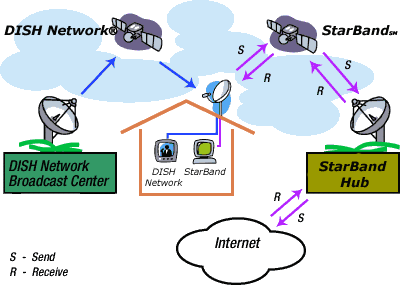
Two-way satellite Internet uses Internet Protocol (IP) multicasting technology, which means up to 5,000 channels of communication can simultaneously be served by a single satellite. IP multicasting sends data from one point to many points (at the same time) by sending data in compressed format. Compression reduces the size of the data and the bandwidth. Usual dial-up land-based terrestrial systems have bandwidth limitations that prevent multicasting of this magnitude.
Some satellite-Internet service still requires you to have a dial-up or cable modem connection for the data you send to the Internet. The satellite data downlink is just like the usual terrestrial link, except the satellite transmits the data to your computer via the same dish that would allow you to receive a Pay-Per-View television program.
So, if you are in a rural area and you want broadband access to the Internet, satellite Internet may be for you!
--------------------------------------------------------------------------------

How do you access the Internet other than dial-up if you live too far from a phone company office for DSL and there is no cable TV on your street? Satellite Internet access may be worth considering. It's ideal for rural Internet users who want broadband access.
Satellite Internet does not use telephone lines or cable systems, but instead uses a satellite dish for two-way (upload and download) data communications. Upload speed is about one-tenth of the 500 kbps download speed. Cable and DSL have higher download speeds, but satellite systems are about 10 times faster than a normal modem.
Firms that offer or plan to offer two-way satellite Internet include StarBand, Pegasus Express, Teledesic and Tachyon. Tachyon service is available today in the United States, Western Europe and Mexico. Pegasus Express is the two-way version of DirecPC.
Two-way satellite Internet consists of:
* * Approximately a two-foot by three-foot dish
* * Two modems (uplink and downlink)
* * Coaxial cables between dish and modem
The key installation planning requirement is a clear view to the south, since the orbiting satellites are over the equator area. And, like satellite TV, trees and heavy rains can affect reception of the Internet signals.

Two-way satellite Internet uses Internet Protocol (IP) multicasting technology, which means up to 5,000 channels of communication can simultaneously be served by a single satellite. IP multicasting sends data from one point to many points (at the same time) by sending data in compressed format. Compression reduces the size of the data and the bandwidth. Usual dial-up land-based terrestrial systems have bandwidth limitations that prevent multicasting of this magnitude.
Some satellite-Internet service still requires you to have a dial-up or cable modem connection for the data you send to the Internet. The satellite data downlink is just like the usual terrestrial link, except the satellite transmits the data to your computer via the same dish that would allow you to receive a Pay-Per-View television program.
So, if you are in a rural area and you want broadband access to the Internet, satellite Internet may be for you!
--------------------------------------------------------------------------------
Subscribe to:
Posts (Atom)

Rupee Mail
 Trust me its Work but too slow